


B2B ecommerce for distributors: pricing
byBruno Galo · Published on 15 Mar 2026
Last updated 27 Oct 2026
Distributors approaching B2B ecommerce usually start from a consumer platform, because that is what the market sells and what the demonstrations look impressive on. The demonstration works. Then someone asks what price a customer sees, and the project changes shape.
In consumer ecommerce, price is an attribute of the product. In distribution, price is a function of the customer, the product, the quantity, the contract, the currency, any promotion in effect, and occasionally the date. The same item legitimately sells at several different prices on the same day, every one of them correct. A storefront that cannot express that either shows list price to everyone — which is commercially useless to a customer with a negotiated agreement — or maintains a second pricing model alongside the ERP, which will diverge.
Credit is the same problem in a different form. A consumer transaction is settled at checkout. A distribution transaction is an extension of credit against a limit, an exposure and payment terms that the storefront must know about at the moment of order.
Why this matters
For most distributors, B2B ecommerce is not a growth channel so much as a cost-to-serve channel. The volume already exists; it arrives by phone, email and PDF, and each order consumes sales-office time re-keying something a customer already specified. Moving that volume to self-service is where the return sits, and it depends entirely on whether the customer trusts what the storefront tells them.
That trust is fragile in a specific way. A customer who sees the wrong price once will check every price afterwards, which means calling the sales office — and the channel has then added work rather than removed it. The same applies to availability and delivery dates. B2B self-service adoption is essentially a function of whether the data is right, not of the interface.
There is a competitive dimension too. Ordering convenience has become a purchasing criterion for buyers who order the same items repeatedly and want reorder, order history, and their own part numbers rather than yours. These are unglamorous features that determine whether the channel is used.
At a glance: what a distribution storefront must resolve
| Requirement | Consumer platform default | What distribution needs |
|---|---|---|
| Price | One price per product | Customer-specific, quantity-break, contract, currency — derived from the ERP |
| Credit | Payment at checkout | Limit, current exposure, terms, hold status checked at order |
| Payment terms | Card at checkout | Customer-specific net terms from the ERP |
| Availability | Single stock figure | Availability by location, with reservation and a promised date |
| Catalogue | Same for everyone | Customer-specific — contracted items only, or restricted ranges |
| Part numbers | Yours | The customer's own codes, searchable |
| Units of measure | Each | Each, box, pallet, with conversion and minimum quantities |
| Order approval | None | Buyer hierarchies with approval thresholds on the customer's side |
| Reorder | Wishlist | Order history, saved lists, scheduled and recurring orders |
| Documents | Order confirmation | Order confirmation, delivery note, invoice, statement, all self-service |
| Tax | Consumer VAT | B2B treatment, reverse charge, cross-border, exemption certificates |
The first two rows determine whether the project is viable. Everything else determines whether it gets used.
How NetSuite models contract pricing and credit
NetSuite holds the contract; the storefront either reads it or holds a projection of it. The constructs involved, as Oracle documents them (checked 16 October 2026):
- Price levels. With the Multiple Prices feature, each item carries alternative prices (list, wholesale, distributor), and a customer gets a default price level on the Financial subtab of the customer record.
- Pricing groups. The Group Pricing subtab pairs a pricing group of items with a price level for that customer.
- Customer-specific item pricing. The Item Pricing subtab sets, per item, either a price level or a Custom absolute price: "the price you want to always charge this customer for this item". Oracle states that item price levels override the customer's Price Level field and the pricing-group levels, and that absolute prices override all other prices and price levels. This is the contract price.
- Quantity pricing schedules. Reusable schedules of quantity breaks (up to four non-zero levels each) that generate prices across the price levels.
- Currencies and terms. With Multiple Currencies, prices are held per currency. Payment terms sit on the customer record.
- Credit limit and hold. The customer record holds a limit and a hold setting (Auto, On or Off): On blocks credit sales whatever the balance, Off disables the checks, Auto follows the limit. The accounting preference Customer Credit Limit Handling (Ignore, Warn Only or Enforce Holds) decides whether a sales order over the limit passes, warns or is blocked.
Oracle adds that with a web store and custom price levels, "customers see this price in your store after they log in".
Precedence, as far as Oracle documents it. A custom absolute item price wins over everything; an item price level beats the customer's own price level and any pricing-group level. Oracle's pages do not rank the customer price level against pricing groups, or say how quantity schedules and promotions interact with customer pricing. Do not assume the rest: write down your actual precedence, promotions included, because that is where the undocumented behaviour sits.
Which B2B ecommerce platform handles distributor contract pricing?
Several can, if you bring the contract in. SuiteCommerce reads NetSuite price levels directly, while Shopify (catalogs per company), BigCommerce B2B Edition (price lists per customer group) and Adobe Commerce B2B (shared catalogs per company) hold customer-specific prices that you populate from the ERP. The deciding question is whether your NetSuite pricing logic fits that model without a second pricing engine.
Checked 16 October 2026 against vendor documentation; plans and editions change, so confirm before you commit.
| Need | SuiteCommerce | Shopify B2B | BigCommerce B2B Edition | Adobe Commerce B2B |
|---|---|---|---|---|
| Customer-specific prices | Reads NetSuite price levels; test item-level customer prices | Catalogs: assigned to companies and locations on Plus; up to 3 active catalogs across B2B markets on Basic, Grow and Advanced | Price lists assigned to customer groups, to which companies are linked | Shared catalogs with fixed or percentage custom prices, assigned to companies |
| Quantity breaks | NetSuite quantity schedules; test in your theme | Volume pricing, up to 10 breaks per product, plus quantity rules (minimum, maximum, increments) | Bulk pricing tiers on price list records | Tier prices, set by quantity per product |
| Payment terms | NetSuite terms; test they show at checkout | Per company or location: Net 7 to 90, due on fulfilment, deposits on Plus | Per company: due on receipt, Net 5 to Net 60 (needs B2B Checkout and Invoices) | Payment on Account; due-date terms not documented on the credit page |
| Credit limit | Enforced by NetSuite; storefront behaviour undocumented, test it | No native credit-limit setting; apps or custom checkout validation | Company credit is a maximum for a single order, with an optional credit hold | Credit limit, outstanding balance and available credit per company |
| Order history and reorder | Native, from NetSuite | Native for B2B customers | Native | Native, with requisition lists |
Three ways to connect the storefront
1. The storefront reads the ERP (SuiteCommerce). No pricing sync: the price a customer sees is the one NetSuite resolves for them. The trade-off is the platform itself; we compare the two routes in SuiteCommerce vs Shopify. Test prices, quantity schedules and credit holds in a sandbox first: Oracle's credit pages do not describe storefront behaviour.
2. One-way projection from NetSuite. Price lists, catalogs, payment terms and credit status are pushed into the platform's own objects when they change, through Celigo flows or a custom integration. Rules that make it safe: nobody edits prices in the storefront, and a nightly job compares a sample of customer-and-item prices with NetSuite and reports differences. Pricing is never maintained in two places: a read-only copy regenerated from the source is acceptable; a second pricing model is not. Mind platform limits, such as Shopify's cap on active catalogs on lower plans, or BigCommerce price lists not combining with customer-group discounts. Companies, customer groups and terms are customer data, so a clean customer record sync comes first. We cover the platforms in our Shopify, WooCommerce and Magento integration pages.
3. Live lookup at cart and checkout. The storefront asks NetSuite, or a cache fed by it, for the price and credit decision for that customer at that moment. It is the most exact option, and the only one that sees an order placed by phone five minutes ago. It needs API capacity planning and a defined fallback when NetSuite is slow: show the last known price with a flag, or stop the checkout.
Projection suits most mid-market catalogues. Use a live lookup for credit decisions and for pricing too complex to project, such as many overlapping promotions. Choose SuiteCommerce when you would rather not run a sync at all.
Credit limits and payment terms at checkout
- Map hold states to behaviour. Hold On: block credit orders and offer card payment. Auto and over the limit: a held order with a clear message. Off: no check. The Customer Credit Limit Handling preference must match what the storefront promises, since Warn Only never blocks anything.
- Count open orders, not just open invoices. Decide whether the storefront reads NetSuite's balance or adds its own cart total, and avoid counting the same order twice.
- Show the terms NetSuite will invoice. Payment terms at checkout must equal the terms on the invoice.
What happens after the due date is a different problem, covered in the dunning agent.
What works, and what to be honest about
What works:
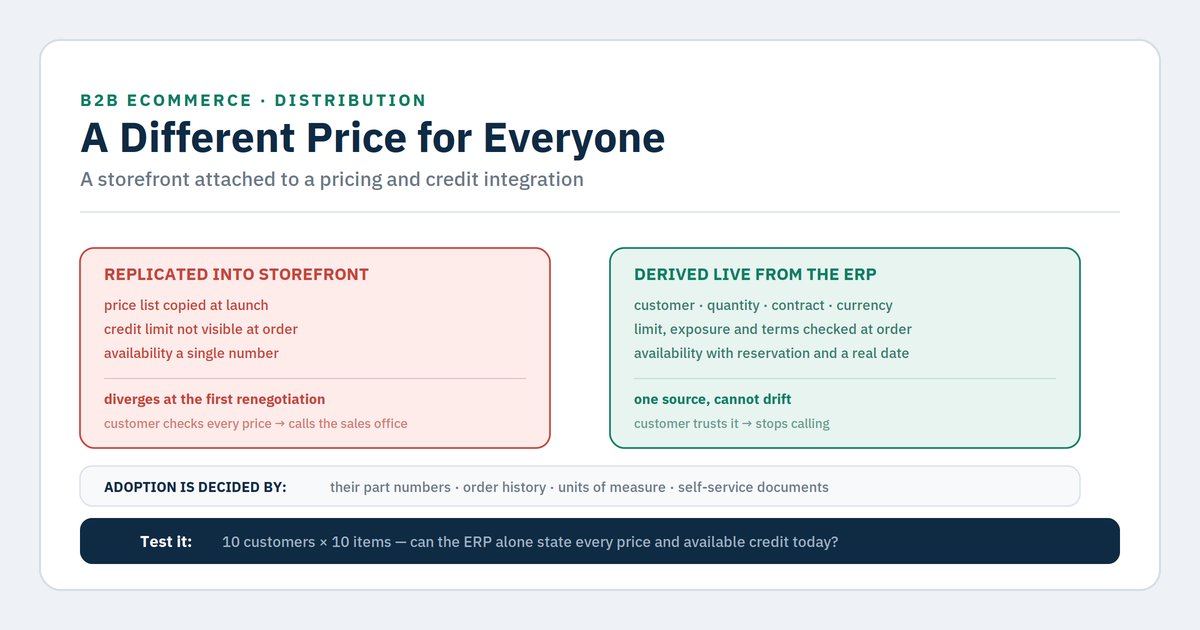
Price derived from the ERP, never maintained twice. The pricing engine stays where the price lists, contracts and quantity breaks already live. The storefront either asks it at request time or holds a read-only projection regenerated from it (the three patterns are above). Any architecture that lets someone edit a second copy of pricing in the storefront will diverge — not immediately, but at the first contract renegotiation nobody remembers to mirror.
Credit checked at order placement, with a defined behaviour when it fails. Not a silent hold discovered days later. The customer should know at the point of ordering whether their order will proceed, be held, or require payment — and which. This is a commercial decision about what to disclose, and it needs making explicitly rather than defaulting to whatever the platform does. How hold states map to storefront behaviour is covered under credit limits and payment terms at checkout.
Customer part numbers as a first-class search field. Buyers search using their own codes. A storefront that only accepts the distributor's codes forces the buyer to translate, which is exactly the friction that sends them back to email.
Realistic delivery promises rather than optimistic ones. A B2B buyer will accept a longer date; they will not forgive a missed one, because they have committed to their own customer on the strength of it. Promise from actual availability and reservation, with location and lead time factored in.
Self-service documents. Invoice copies, delivery notes and statements available without contacting anyone removes a surprising volume of inbound calls, and it is usually straightforward to implement.
Order history as the primary interface. Most B2B ordering is repeat ordering. A storefront organised around reorder rather than browse matches how the channel is actually used.
What to be honest about:
Your pricing model is probably more complicated than anyone has documented. Every distributor we have worked with has discovered undocumented pricing behaviour during this work — a customer with a special arrangement recorded in someone's memory, an override applied manually for years, overlapping promotions with no defined precedence. Surfacing this is genuinely valuable and it will consume time you did not plan for.
The sales team may not want this. If relationships and order-taking are how account managers demonstrate value, self-service can feel like a threat. Adoption depends on repositioning the role toward accounts and margin rather than order entry, and that conversation belongs before launch, not after.
Not every customer should see a storefront. Customers with genuinely complex requirements, project quoting or configured products may be better served by the sales office. Attempting universal coverage produces a platform too complex to maintain for the majority who wanted reorder.
Data quality becomes customer-facing. Item descriptions, images, specifications and pack quantities that were adequate internally are now visible to buyers. This is frequently the largest unplanned workstream in the project, and it is a content problem rather than a technical one.
Adoption is slow and needs deliberate migration. Customers do not switch because a storefront exists. It takes account-by-account onboarding, and usually a reason — a discount, a service level, or the sales office gently declining to take routine orders by email.
Decision framework: where to start
Run in order. Stop at the first match.
1. Is your pricing logic fully expressed in the ERP, or does some of it live in people's heads?
If any of it is undocumented, surface it first. This is the single most common cause of stalled B2B ecommerce projects, and it takes a few weeks of unglamorous work that pays back regardless of whether the storefront ships.
2. Can the storefront request a live price and credit decision from the ERP?
If not, resolve that architecture before anything else. Pricing maintained independently of the ERP is a certainty of divergence and it will destroy customer trust in the channel.
3. Is your item data fit to be seen by a customer?
If descriptions are internal shorthand, pack quantities are inconsistent, or images are absent, this is a content workstream with real duration. Assess it early and staff it separately from the technical build.
4. Do you know which customers and which order types belong in the channel?
Segment deliberately. Start with high-frequency repeat orderers on standard products — the clearest return and the least complexity.
5. Can you show availability with a defensible delivery date?
If availability is a single number without reservation or location logic, fix that first. A missed promise costs more in this channel than a slow one.
6. Is your sales team's role redefined and communicated?
Do this before launch. Adoption is driven by account managers, and account managers who see the channel as a threat will not drive it.
7. All of the above and adoption still low?
The barrier is usually a specific friction rather than a general reluctance — customer part numbers, minimum quantities, or an approval flow that does not match how the buyer's organisation works. Ask ten customers who did not adopt; the answer is rarely a surprise once asked.
Indicative cost and effort
| Workstream | Typical elapsed time | Effort profile |
|---|---|---|
| Pricing logic discovery and documentation | 3–6 weeks | Medium — unglamorous, always necessary |
| Live pricing and credit integration | 6–12 weeks | Medium to heavy — the core of the project |
| Item content remediation | 6–20 weeks | Heavy — scales with catalogue size, run in parallel |
| Customer part number cross-reference | 3–6 weeks | Medium — data collection from customers |
| Availability, reservation and delivery date logic | 5–10 weeks | Medium |
| Buyer hierarchies and approval flows | 3–6 weeks | Medium |
| Self-service documents | 2–4 weeks | Light |
| Storefront build and configuration | 8–16 weeks | Medium |
| Customer onboarding and migration | Ongoing | Light per account, sustained effort |
Assumes one ERP instance, one primary currency and a mid-market catalogue. Multi-entity, multi-currency or configured products extend this materially. Get a quote for a scoped estimate.
Frequently asked questions
Which B2B ecommerce platform handles distributor contract pricing?
Several can. SuiteCommerce reads NetSuite price levels directly, and Shopify, BigCommerce B2B Edition and Adobe Commerce B2B hold customer-specific prices in catalogs, price lists and shared catalogs that you populate from NetSuite. The deciding question is whether your pricing logic fits that model without a second pricing engine. The comparison above maps each need.
How do I check whether a B2B platform supports customer-specific pricing, credit terms and order history?
Check six things: (1) per-customer or per-account price lists; (2) quantity breaks; (3) payment terms per account; (4) a real credit check at checkout, not just a field; (5) order history and reorder; (6) whether all of it can be fed from NetSuite without manual edits.
Should contract prices be synced to the storefront or looked up live?
A read-only projection regenerated from NetSuite suits most catalogues; a live lookup suits credit decisions and pricing too complex to project. Either way, never maintain pricing in two places.
Should we build on a consumer platform or a B2B-specific one?
Less important than whether pricing and credit come from the ERP, either live or as a read-only projection. A consumer platform with a well-designed integration can serve a distributor adequately; a B2B-specific platform whose prices are edited separately from the ERP will still diverge. Judge candidates on that integration model first. For how the main platforms compare, see which platform handles contract pricing.
Do we show list price or contract price to a logged-out visitor?
A commercial decision, and both are defensible — list price with a prompt to log in, or no price at all. What is not defensible is showing a price the customer will not be charged, which is the fastest way to lose trust in the channel.
Can the storefront enforce NetSuite credit limits?
Yes, if the integration reads the hold status or available credit from NetSuite at checkout. Shopify has no native credit-limit setting, so an app or custom checkout validation fills the gap; BigCommerce company credit is a maximum for a single order; Adobe Commerce keeps its own limit and balance, which must then be synced with NetSuite.
How do we handle customers who exceed their credit limit mid-order?
Decide the behaviour explicitly: block, allow into a held state with clear communication, or offer payment. The worst option is silent acceptance followed by a hold the customer discovers when their delivery does not arrive.
What about customers who want to keep ordering by email?
Let them, initially. Forced migration generates resentment in accounts you rely on. Move volume by making self-service genuinely better — order history, documents, accurate dates — and by having account managers guide the routine orders across.
Where do agents fit in this channel?
Two clear places. Processing orders still arriving by email or PDF, extracting and validating them against the ERP so they need no re-keying — which serves the customers who will not migrate. And exception routing on storefront orders that fail credit, pricing or availability checks.
Closing — Next steps
B2B ecommerce for a distributor is a pricing and credit integration project with a storefront attached. The interface is the least difficult part and the part that attracts all the attention in vendor selection.
The starting point costs nothing and is genuinely diagnostic: take ten customers and ten items and try to state, from the ERP alone, what price each customer would pay for each item today, and what their available credit is. If you cannot produce all hundred answers from the system, you have found the project — and it is upstream of any platform decision.
About the author
Bruno Galo is the founder of Atypical Tech, a NetSuite consultancy serving mid-market clients across Iberia. He specializes in connecting CRM and ERP systems for seamless order-to-cash workflows, building automated order management pipelines that eliminate manual data entry between sales and finance teams. As an official Stacksync implementation partner, Bruno designs and deploys AI agents on integration platforms to handle exception routing, document processing, and reconciliation — turning fragmented order flows into reliable, self-monitoring systems.
LinkedIn: https://www.linkedin.com/in/brunogd
Sources
- Oracle NetSuite, Setting Up Price Levels for Customers — https://docs.oracle.com/en/cloud/saas/netsuite/ns-online-help/section_N2182485.html
- Oracle NetSuite, Entering Financial Information for the Customer — https://docs.oracle.com/en/cloud/saas/netsuite/ns-online-help/section_N1078064.html
- Oracle NetSuite, Quantity Pricing Schedules — https://docs.oracle.com/en/cloud/saas/netsuite/ns-online-help/section_N2183677.html
- Oracle NetSuite, Managing Customer Credit Limits and Holds — https://docs.oracle.com/en/cloud/saas/netsuite/ns-online-help/section_N1080144.html
- Oracle NetSuite, Credit Limit Preferences — https://docs.oracle.com/en/cloud/saas/netsuite/ns-online-help/bridgehead_4490498729.html
- Shopify Help Center, B2B catalogs — https://help.shopify.com/en/manual/b2b/catalogs
- Shopify Help Center, B2B payment terms — https://help.shopify.com/en/manual/b2b/checkout-and-orders/payment-terms
- Shopify Help Center, quantity rules and volume pricing — https://help.shopify.com/en/manual/b2b/catalogs/quantity-pricing
- BigCommerce, Companies and Customer Groups in B2B Edition — https://support.bigcommerce.com/s/article/Companies-and-Customer-Groups
- BigCommerce, company credit settings — https://www.bigcommerce.com/blog/company-level-credit-settings/
- BigCommerce developer documentation, Price Lists — https://docs.bigcommerce.com/developer/docs/admin/catalog-and-inventory/pricing/price-lists
- BigCommerce developer documentation, B2B credit and payment terms — https://docs.bigcommerce.com/developer/learn/courses/b2b-graphql/company/credit-payment
- Adobe Commerce, shared catalogs — https://experienceleague.adobe.com/en/docs/commerce-admin/b2b/shared-catalogs/catalog-shared
- Adobe Commerce, shared catalog pricing and structure — https://experienceleague.adobe.com/en/docs/commerce-admin/b2b/shared-catalogs/define/catalog-shared-pricing-structure
- Adobe Commerce, company credit — https://experienceleague.adobe.com/en/docs/commerce-admin/b2b/companies/credit-company
- European Commission, VAT rules for B2B cross-border supplies and reverse charge — https://taxation-customs.ec.europa.eu
- European Commission, Late Payment Directive (2011/7/EU) — commercial credit terms — https://single-market-economy.ec.europa.eu
- GS1, product identification and data quality standards — https://www.gs1.org
- Atypical Tech engagement experience, mid-market distribution implementations across Iberia
Comments
No comments yet.
Leave a comment
Your comment will be reviewed before publishing.
Controller: Atypical Tech S.L. Purpose: to answer your enquiry. Legal basis: your consent. Rights: access, rectification, erasure and the others described in the policy, by writing to hello@atypicaltech.com.