









When Magento and NetSuite drift apart
On a small catalogue a nightly CSV import gets by. On a large or B2B-heavy Magento store the same shortcuts show up as problems every week:
- Attributes and configurable products drift. A new size or colour exists in NetSuite as a matrix child item and never reaches the Magento configurable product, or it arrives as a loose simple product nobody can find.
- B2B customers see the wrong price. Customer-group and company-specific prices are kept in two places, and the storefront shows last quarter's price list.
- Stock is wrong on one website and right on another. Several Magento websites sell from different NetSuite locations, and the mapping lives in someone's head.
- Returns take two routes. A Magento return and a NetSuite return authorization describe the same parcel, with different quantities and different refund amounts.
- Finance closes blind. Orders are batch-imported late or by hand, so revenue, tax and cash in NetSuite lag the store by days. Reconciling payouts against orders becomes a month-end job instead of a daily one.
If a previous connector "mostly works" and nobody owns it, all of this gets fixed by hand, one exception at a time.
Short answer: does Magento integrate with NetSuite? Yes. Magento 2 and Adobe Commerce expose REST and asynchronous APIs, and NetSuite exposes SuiteTalk web services and RESTlets. You can connect them with a prebuilt integration app such as Celigo's, with another connector, or with a custom build. Whichever you pick, the hard part is the design: how products, websites, customer groups and refunds map onto NetSuite records. Moving the data is the easy part.
Magento Open Source or Adobe Commerce: the same integration problem
Adobe Commerce is the commercial edition of Magento, and Magento Open Source is the free one. For the integration they are one platform. Both share the same data model: websites, stores and store views, products, customers and orders. Both share the same APIs, so the integration patterns are the same.
What changes is what has to be synced. Adobe Commerce adds B2B features such as company accounts, shared catalogues with company-specific pricing, quotes and company credit (Adobe Commerce B2B introduction, checked 29 September 2026). If you use them, the integration has to carry those prices and those companies into NetSuite, or at least not break them. We check which edition features you actually use during discovery rather than assuming.
What we sync
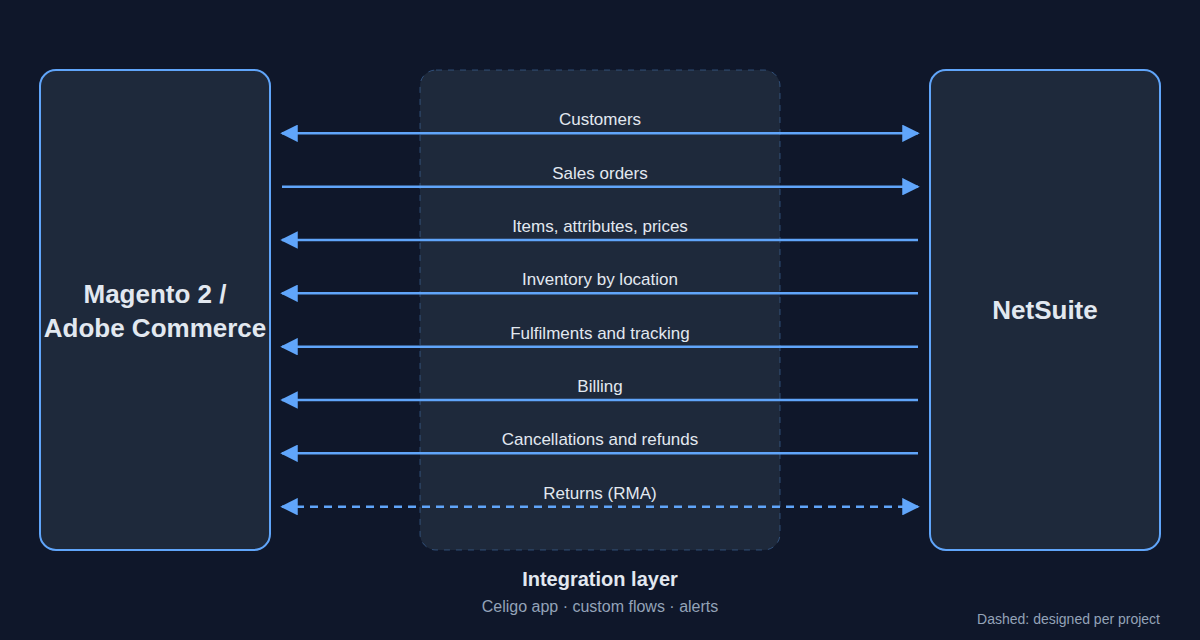
The table lists the flows Celigo publishes for its NetSuite – Magento 2 Integration App (Celigo, NetSuite – Magento 2 Integration App, checked 29 September 2026), plus returns, which we design per project.
| Flow | Direction | What moves |
|---|---|---|
| Customers | Magento → NetSuite, and NetSuite → Magento where needed | Customer records and addresses |
| Sales orders | Magento → NetSuite | Orders from the store, including discounts and redeemed gift cards as order lines |
| Orders created in NetSuite | NetSuite → Magento | Orders keyed in the back office, when they need to show in the customer's account |
| Items and products | NetSuite → Magento | Products, images, categories, attributes and pricing, including NetSuite matrix and kit items |
| Inventory | NetSuite → Magento | Stock levels from one or several NetSuite locations |
| Fulfilments | NetSuite → Magento | Shipments and tracking, so the customer sees the order as shipped |
| Billing | NetSuite → Magento | Invoice and payment status, as designed for your capture model |
| Cancellations and refunds | NetSuite → Magento | Cancelled orders and refunds, recorded in NetSuite as cash refunds or credit memos |
| Returns (RMA) | Both ways, where in scope | Magento returns matched to NetSuite return authorizations. Designed per project, not a standard app flow |
Three routes: Celigo, another connector, or custom
| Route | Fits when | Watch out for |
|---|---|---|
| Celigo Magento 2 – NetSuite Integration App | Your processes are close to standard order-to-cash and you want monitoring, error management and alerts on a platform rather than in code | Licence cost, and edge cases that need custom flows beside the app |
| Another Magento–NetSuite connector | A narrow scope, such as orders and stock only, that a simpler product covers | Who supports it, how it handles errors and retries, and whether it covers your edition's features |
| Custom API build | Heavy B2B logic, unusual product models, or volumes and timing the templates don't handle | You own the code, the monitoring and the upgrades on both sides |
Celigo is our primary route. Celigo describes support for the key NetSuite item types (inventory, matrix, kits). It connects several Magento websites, stores and store views to one NetSuite account. It can post discounts to NetSuite as coupon codes, promotions or line items, and it can calculate tax with NetSuite's SuiteTax or Magento's own tax engine (Celigo, checked 29 September 2026). The app runs on Celigo's integration platform, so the flows get the platform's dashboards, error management and alerts. Custom flows can sit beside the app on the same platform.
Other connectors exist, from Magento extensions to partner-built middleware. Some are a good fit for a narrow scope. Before choosing one, ask who fixes it when an order fails at 2 a.m., and whether anyone other than the original developer understands it.
Custom means Magento's REST and asynchronous bulk APIs on one side and NetSuite SuiteTalk or RESTlets on the other. Magento's asynchronous endpoints queue each request and hand back an identifier you can check later, which matters for large catalogue updates (Adobe Commerce, asynchronous web endpoints, checked 29 September 2026). We build custom when the template is exceeded, not by default. Often the answer is a hybrid: the app for the standard flows, custom flows for the one process that is yours alone.
For the wider trade-off between an iPaaS, point-to-point code and middleware, see iPaaS vs point-to-point vs middleware.
Magento-specific design decisions
These are the decisions that make or break a Magento–NetSuite integration. We settle them in the blueprint, before any flow is built.
- Configurable and bundle products. Decide which NetSuite item type backs each Magento product type: matrix items for configurables, kits or assemblies for bundles. Then decide which system owns the attributes. Getting this wrong is the most common cause of catalogue drift.
- Websites, stores and store views. Magento cascades configuration from global to website, store and store view. Store views usually carry language and currency (Adobe Commerce, site, store and view scope, checked 29 September 2026). Each website has to map to a NetSuite subsidiary, location, price level and currency. Settle that mapping explicitly.
- B2B customer groups and company pricing. Choose where prices are mastered and how customer groups and shared catalogues map to NetSuite price levels or customer-specific pricing. Also choose what happens when the two disagree.
- Tax. Pick one engine, SuiteTax or Magento's, to calculate tax, and make sure the other system reports it rather than recalculates it.
- Payments and capture. Decide whether payment is captured in Magento at checkout or in NetSuite after fulfilment, because that changes the invoice and cash flows.
- Incremental catalogue sync. Send only what changed, in batches Magento's asynchronous API can absorb, rather than pushing the full catalogue every night.
- Returns and refunds. Decide which system opens the return, and whether a refund becomes a cash refund or a credit memo in NetSuite. Then keep the two records linked. Our article on returns, refunds and credit notes covers the accounting side.
How the project runs
- Discovery call. Thirty minutes on your systems, your editions, your worst manual steps, and whether the Celigo app, a connector or custom work fits.
- Integration blueprint. We map every flow and the design decisions above, and give you a fixed scope with effort and timeline.
- Build and test. We build in sandboxes, test with your real catalogue and real orders, and go through the edge cases with your team: configurables, multi-website stock, B2B prices, refunds.
- Go-live and support. We deploy, watch the first syncs closely, and stay on.
After go-live
An integration without an owner decays. After go-live we monitor the flows in production, handle errors and retries, and change the flows when your catalogue, websites or processes change. Alerts go to someone who knows what the flow does. If you would rather own it yourself, we train your team and hand over documentation that reflects what is actually running. What goes wrong after launch, and who fixes it, is covered in life after go-live.
Why Atypical Tech
- Authorized Celigo Partner. Celigo integrations are our core practice, not a side offering. See our Celigo partnership.
- NetSuite depth. Over ten years of ERP and integration engineering. We know the records and the accounting behind every flow, not just the plumbing.
- Ecommerce order-to-cash end to end. From ecommerce orders into the ERP to inventory accuracy across channels. We also integrate NetSuite with Shopify and NetSuite with WooCommerce.
- Europe, in your language. Senior engineers based in Spain, working in English, Spanish, Portuguese and Catalan, in your timezone.
Sources
- Celigo, NetSuite – Magento 2 Integration App, checked 29 September 2026.
- Adobe, Introduction to Adobe Commerce B2B, checked 29 September 2026.
- Adobe, Site, store and view scope, checked 29 September 2026.
- Adobe, Asynchronous web endpoints, checked 29 September 2026.