









Short answer: WooCommerce and NetSuite can be connected four ways: a prebuilt connector or plugin (Oracle's NetSuite Connector lists WooCommerce), Celigo's WooCommerce–NetSuite template on integrator.io, an order operations platform such as Pipe17 in the middle, or a custom build against the WooCommerce REST API and NetSuite's APIs. The right one depends on your volume, how far your store has been customised with plugins, and who will maintain the integration afterwards.
When WooCommerce and NetSuite don't talk, your team becomes the connector
The symptoms are familiar. Orders exported from WooCommerce as CSV and imported into NetSuite, or retyped. Stock that says one thing in the store and another in NetSuite, so you either oversell or hide stock you could have sold. Refunds processed twice, once in each system, and still not matching the credit memos. Payment gateway payouts that finance can't tie back to orders. The same customer created three times.
WooCommerce adds its own layer. It runs on WordPress, and the plugins that make it flexible (custom checkout fields, bundles, subscriptions, B2B pricing) also change what an order looks like when it reaches NetSuite. Every increase in sales turns into more admin work, and every new plugin is another thing the integration has to understand.
What we sync between WooCommerce and NetSuite
Each flow below is designed, tested and monitored on its own. The direction is the usual one; your case decides the final design.
| Flow | Direction | What it covers | What usually goes wrong, and how we handle it |
|---|---|---|---|
| Orders | WooCommerce → NetSuite | Sales order or cash sale depending on your process; taxes, discounts, coupons, shipping, plugin fields | Duplicates when a delivery is retried. We use idempotent keys and an error queue, so a retry never creates a second order. |
| Inventory and availability | NetSuite → WooCommerce | Available quantity per location, including what counts as available (on hand, committed, in transit) | Overselling at peak. We decide the source of truth and the reservation logic before writing a single mapping. |
| Products, prices and catalogue | NetSuite → WooCommerce | SKUs, variations, prices, B2B price lists | Variable products that don't map cleanly to NetSuite matrix items. We agree the mapping on real SKUs first. |
| Fulfilment and tracking | NetSuite (or 3PL/WMS) → WooCommerce | Item fulfilment, carrier, tracking number, partial shipments, order status | Partial shipments marked complete in the store. Status changes follow the fulfilment records, not the other way round. |
| Returns, refunds and cancellations | WooCommerce ↔ NetSuite | Return authorisations, credit memos or cash refunds, cancellations, restocking | The reverse flow gets discovered in the first week of trading. We design it before go-live. |
| Customers | WooCommerce → NetSuite (and back for B2B) | Guest and registered customers, dedupe rules, B2B companies and terms | Duplicate customers from guest checkout. Matching rules are agreed and tested with your data. |
| Payouts and reconciliation | Payment gateway → NetSuite | Payouts from your gateways recorded as deposits with their fees, so finance can reconcile | Payouts that bundle many orders and fees. Each payout is broken down so it ties back to the orders it pays. |
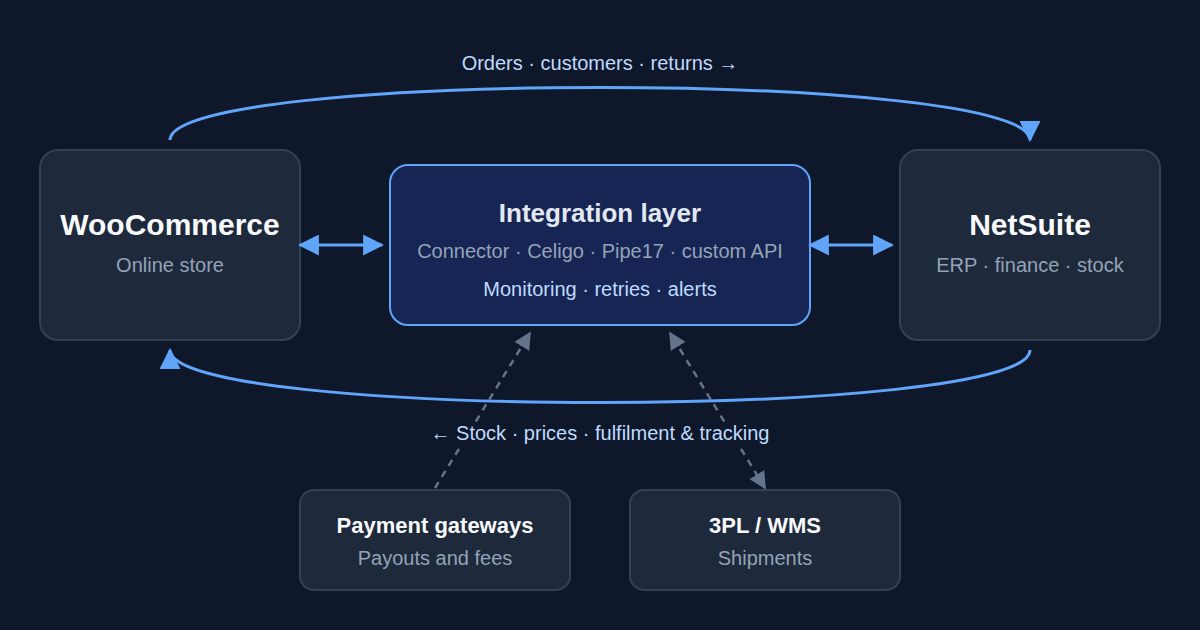
If it has an API, it can be connected: 3PLs, warehouse systems, EDI or SFTP feeds, marketplaces and payment providers sit in the same design. For the deeper reasoning on each flow, see why stock drifts between channels, designing the reverse flow and reconciling payouts and settlements.
Four ways to connect WooCommerce and NetSuite, and how we choose
There is no integration built into WooCommerce or NetSuite themselves. What exists is a set of routes, each with a place where it fits.
| Route | Best when | Watch out for | Who runs it |
|---|---|---|---|
| Prebuilt connector or plugin | Standard flows, few plugins that change order data | Customisations the connector wasn't built for | The vendor, plus whoever owns the configuration |
| Celigo WooCommerce–NetSuite template | You want a managed iPaaS and a starting point you can extend | A template is a starting point: it still needs mapping to your process | Us, or your team after handover, on Celigo's platform |
| Order operations platform (Pipe17) | Several channels, 3PLs and locations to orchestrate, not just one store | Another platform and contract in the middle | The platform vendor, plus your team |
| Custom build against the APIs | Volume, latency, data residency or unusual logic rule out a platform | You need someone to maintain it: documented and monitored, or it becomes a black box | Us, or your team after handover |
Prebuilt connector or plugin
Oracle's NetSuite Connector lists WooCommerce among its supported storefronts, and the WooCommerce Marketplace has NetSuite extensions from third-party vendors. For a store with standard flows, that can be enough. It gets harder when plugins reshape orders, when you run several subsidiaries, or when refunds and B2B pricing need logic the connector doesn't have.
Celigo WooCommerce–NetSuite template
Celigo's Marketplace includes a WooCommerce–NetSuite quickstart integration template. Its flows sync WooCommerce products to NetSuite items, orders to sales orders and customers to customers, and send NetSuite order status and cash refunds back to WooCommerce. As a Celigo implementation partner we install it, map it to your process, and add the flows it doesn't cover, such as inventory per location, fulfilment detail or payouts. Celigo flows can be scheduled or event-driven, so we say "near real time where needed", not real time everywhere.
Order operations platform: Pipe17
Pipe17 describes itself as an order operations platform that connects WooCommerce to fulfilment networks, marketplaces and ERPs, NetSuite among them. It makes sense when WooCommerce is one channel among several and the problem is routing orders across 3PLs and locations. We don't resell it; if it already sits in your stack, we design NetSuite's side of the flows around it.
Custom build against the APIs
The WooCommerce REST API and webhooks on one side, NetSuite's SuiteTalk REST and SOAP web services or RESTlets on the other, written in our own stack. No third-party licence in the middle and no connector limits to design around. One WooCommerce detail shapes every custom design: WooCommerce disables a webhook after more than five consecutive delivery failures. So a custom build needs a receiver that always answers, a queue behind it, and a scheduled reconciliation that catches whatever a webhook missed.
Which one we use follows your case: the volume, the latency you need, whether the data can leave your infrastructure, and what your team will maintain afterwards. We are not resellers; the recommendation follows your case, not a quota. For the architecture behind these choices, read four architectures for getting ecommerce orders into your ERP and iPaaS vs point-to-point vs middleware.
How a NetSuite–WooCommerce project runs
- Discovery call (30 minutes). Your systems, your plugins, your manual processes, and where automation pays off fastest.
- Integration blueprint. We map the flows, choose the route and give you a fixed scope with effort and timeline.
- Build and test in a sandbox. With your real data, iterating until the edge cases are covered: refunds, partial fulfilments, coupons, plugin fields, B2B orders.
- Go-live and monitoring. We deploy, watch the first syncs closely and stay on.
A first live flow takes weeks rather than months. The full scope and its timeline are fixed in the blueprint, not guessed before it.
After go-live: monitoring, errors and ownership
Error handling, retries and alerts ship with the integration, not as an upsell after the first silent failure. We monitor the flows in production, handle errors and retries, and evolve them as your processes change, including when a WooCommerce or plugin update changes the data an order carries.
Documented flows, no black boxes. We can operate them for you or train your team to own them. If you already have a WooCommerce–NetSuite integration, connector or custom, that "mostly works" and throws errors nobody owns, we can take it over and fix it. More on what the first months look like in life after go-live.
Why companies work with Atypical Tech on NetSuite and WooCommerce
- NetSuite depth, not just plumbing. We're NetSuite specialists who live in ERPs daily. We understand the records, the processes and the finance behind every flow.
- Senior engineers only. The people who scope your project are the ones who build it.
- Partner where it helps, independent where it counts. An Authorized Celigo partner and a Stacksync partner, and we still build directly against APIs when no platform fits.
- Based in Spain, working across Europe. English, Spanish, Portuguese and Catalan, in your timezone.
Running Shopify as well, or instead? See NetSuite and Shopify integration, or all the systems we connect.
Sources
- Oracle NetSuite Help Center, "NetSuite Connector Supported Storefronts and 3PLs", https://docs.oracle.com/en/cloud/saas/netsuite/ns-online-help/section_164723289789.html (checked 29 September 2026).
- Celigo, "WooCommerce – NetSuite Integration Template", https://www.celigo.com/integrations/netsuite-woocommerce/ (checked 29 September 2026).
- Pipe17, "WooCommerce Integration for Multi-Channel Stores", https://pipe17.com/integration/woocommerce/ (checked 29 September 2026).
- WooCommerce, "Webhooks", https://woocommerce.com/document/webhooks/ (checked 29 September 2026).
- WooCommerce developer docs, "WooCommerce REST API", https://developer.woocommerce.com/docs/apis/rest-api/ (checked 29 September 2026).