





Short answer: a Salesforce–PostgreSQL sync that your application depends on needs three things an ETL job does not give you: changes in seconds, writes in both directions, and a rule for what happens when both sides edit the same record. There are three realistic ways to get there: a managed sync platform such as Stacksync, a custom pipeline on Salesforce Change Data Capture, or Heroku Connect for teams already on Heroku Postgres. Most mid-market teams are best served by the first.
Operational sync is not ETL
ETL and reverse ETL move data on a schedule, mostly in one direction, for someone to analyse later. That is the right tool for a warehouse. It is the wrong tool when the PostgreSQL table is read by your application at request time, or when a support agent edits a record in Salesforce and expects the app to reflect it before the customer calls back.
Operational sync treats the two systems as one dataset kept consistent. That changes the requirements:
- Latency is measured in seconds, not in batch windows.
- Both sides write. Salesforce owns some fields, PostgreSQL owns others, and some are edited in both.
- Failures are visible. A missed update is a wrong screen in front of a customer, not a slightly stale dashboard.
If your need is analytics only, a one-way pipeline into a warehouse is simpler and cheaper; our guide to Salesforce to Snowflake real-time sync without Heroku Connect covers that path. This page is about the operational case.
Three ways to sync Salesforce and PostgreSQL
1. A managed bidirectional sync platform (Stacksync). Stacksync connects Salesforce to PostgreSQL and other databases with real-time, two-way sync, field mapping and monitoring included. You run no pipeline infrastructure. Whalesync offers a similar two-way Salesforce–Postgres sync. This is the fastest route to production and the one we recommend when the sync is critical but not your product.
2. A custom pipeline on Salesforce Change Data Capture. Salesforce publishes a change event whenever a record in a subscribed object is created, updated, deleted or undeleted, delivered through the gRPC-based Pub/Sub API. Events stay on the event bus for 72 hours and can be replayed from a stored replay ID. CDC only flows out of Salesforce: writing back needs a separate path through the REST API or Bulk API 2.0, and the initial load needs Bulk API 2.0 as well. This path gives you full ownership and costs you a pipeline to build, run and on-call.
3. Heroku Connect (legacy). Heroku Connect syncs Salesforce with a Heroku Postgres database, read-only or read-write. It reads by polling, with an optional accelerated polling mode that listens through the Streaming API or CDC, and it writes back by polling a trigger log table in Postgres. It only targets Heroku Postgres, and since February 2026 Heroku runs under a "sustaining engineering" model focused on stability rather than new features.
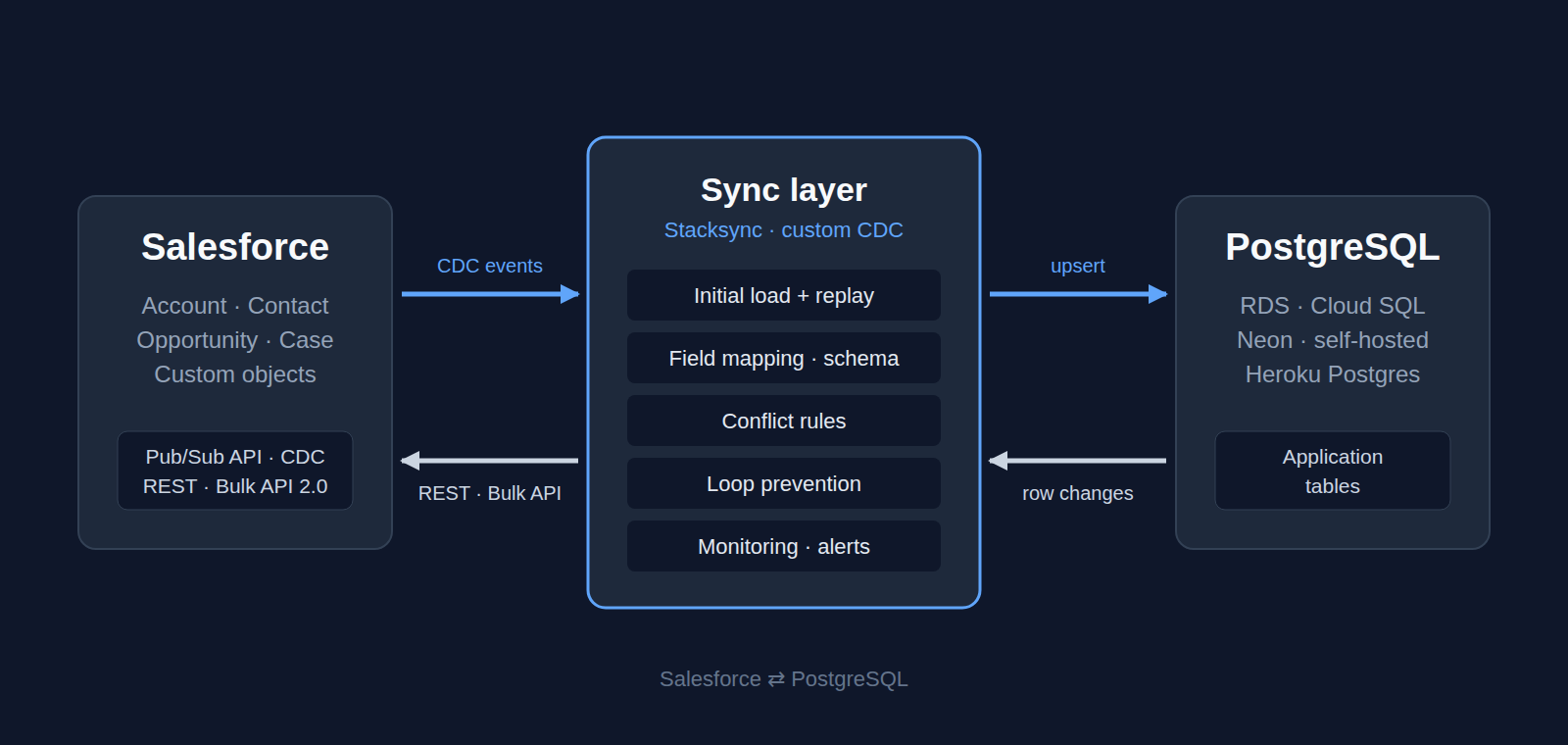
What bidirectional sync must get right
Two-way sync fails in predictable places. Whichever option you choose, these are the parts we design and test before go-live:
- Ownership per field. Decide which system is the source of truth for each field, and which fields are genuinely edited on both sides. Most conflicts disappear once this is written down.
- Conflict resolution. When both sides change the same record, a rule decides: last write wins, one system always wins, or a per-field rule. It has to be explicit, not an accident of timing.
- Loop prevention. A change written into PostgreSQL must not bounce back to Salesforce as a new change, and the other way round. Idempotent writes and origin tracking stop the echo.
- Initial load and cut-in. The first copy of the data comes in bulk; the live stream must start from a point that overlaps it, or you get duplicates or gaps.
- Deletes and merges. Deleted, undeleted and merged Salesforce records need an explicit rule in PostgreSQL, or the database slowly fills with ghosts.
- Schema changes. Admins add fields. The sync has to detect a new Salesforce field and either map it or alert, instead of silently dropping it.
- API limits. Salesforce limits API calls and event delivery per org. A sync that ignores them will eventually throttle your other integrations.
- Recovery. If the consumer is down longer than the 72-hour CDC replay window, only a full reconciliation against a bulk snapshot restores consistency. Plan it before you need it.
Comparison table
| Stacksync (managed) | Custom CDC pipeline | Heroku Connect | |
|---|---|---|---|
| Direction | Two-way | Salesforce → Postgres via CDC; write-back built separately | Read-only or read-write |
| How changes are detected | Real-time sync engine, managed | CDC events via Pub/Sub API | Polling, optional accelerated polling |
| PostgreSQL targets | Any PostgreSQL you run | Any PostgreSQL you run | Heroku Postgres only |
| Initial load | Included | You build it (Bulk API 2.0) | Included |
| Conflict rules, loop prevention | Configured | You build them | Built in, limited control |
| What you operate | Configuration and monitoring | The whole pipeline | The Heroku add-on |
| Best fit | Critical sync, small platform team | Sync is core IP, strong data team | Existing Heroku apps, no migration planned yet |
Read the last row first. If the sync is a means to an end, buy it. If it is part of what you sell, or your volumes and compliance rules make a platform awkward, build it. Our build vs buy analysis for Heroku Connect replacements goes deeper into that trade-off, and Salesforce CDC vs Heroku Connect explains what CDC does and does not cover.
Leaving Heroku Connect
Heroku Connect keeps working, and nothing announced so far sets an end date. What changed is direction: Heroku is in sustaining engineering mode, and Heroku Connect only syncs with Heroku Postgres. Teams moving their database to Amazon RDS, Cloud SQL, Neon or their own servers lose Heroku Connect with it.
A migration off Heroku Connect has a known shape: inventory every mapping, rebuild each flow on the new sync in read-only shadow mode, compare row counts and values, switch writes over one object at a time, then remove the add-on. Our Heroku Connect end-of-life migration guide walks through it step by step.
What we implement
- Sync architecture: which objects, which direction, which system owns each field, and the conflict rules, written down before anything is configured.
- Stacksync implementation, as an official Stacksync partner: connections, field mapping, type casting, filters and alerts, tested against a Salesforce sandbox first.
- Custom CDC pipelines when a platform does not fit: Pub/Sub API consumers, Bulk API 2.0 backfill, write-back with idempotency, replay and reconciliation jobs.
- Heroku Connect migrations, with a parallel run and a cutover plan per object.
- Production support: monitoring, schema changes as your Salesforce org evolves, and a named engineer who knows your setup.
How a project runs
- Discovery. We review your Salesforce objects, your PostgreSQL schema and the flows your application needs, and recommend Stacksync or a custom build, with the reasons.
- Design. Field ownership, direction, conflict rules, delete handling and alerting, agreed with your team.
- Build in a sandbox. Full initial load and live sync against a Salesforce sandbox and a copy of your database.
- Parallel run. The new sync runs beside whatever you use today until the data matches.
- Go-live and hand-over. Cutover object by object, runbook and monitoring in place, support after launch.
Sources
- Heroku Dev Center, Heroku Connect (Heroku Postgres target, plans and limits). Checked 29 September 2026.
- Heroku Dev Center, Reading Data from Salesforce with Heroku Connect (polling, accelerated polling). Checked 29 September 2026.
- Heroku Dev Center, Writing Data to Salesforce with Heroku Connect (trigger log, write algorithms). Checked 29 September 2026.
- Salesforce Developers, Change Data Capture Developer Guide. Checked 29 September 2026.
- Salesforce Developers, Pub/Sub API: Event Message Durability (72-hour retention, replay ID). Checked 29 September 2026.
- Salesforce Developers, Bulk API 2.0. Checked 29 September 2026.
- The Register, Heroku freeze, 9 February 2026 (sustaining engineering model). Checked 29 September 2026.
- Stacksync, PostgreSQL and Salesforce integration. Checked 29 September 2026.
- Whalesync, Salesforce and Postgres two-way sync. Checked 29 September 2026.