









Short answer. Order sync is not settlement sync. Getting orders into NetSuite gives you revenue and receivables. Clearing them takes a second integration that reads each marketplace's settlement report and maps every line to a deposit, an expense line, a credit or a clearing account, with an exception queue for anything it can't place.
Why European sellers feel this more
A brand selling across Europe rarely has one marketplace. It has Amazon's European storefronts, Zalando in fashion, and a growing number of retailers that run their own marketplace on Mirakl. Each one pays on its own schedule, in its own report format, often in more than one currency. The logic is similar from one marketplace to the next, but the configuration is not shared, so each new channel means a new mapping.
Tax adds another layer. Since the EU's e-commerce VAT package took effect on 1 July 2021, a marketplace can be the deemed supplier for VAT in certain flows, such as distance sales of imported goods worth up to €150, or sales by sellers not established in the EU (European Commission, explanatory notes on the VAT e-commerce rules, checked 29 September 2026). Under DAC7, platform operators report sellers' payouts and the fees withheld to the tax authorities (European Commission, DAC7, checked 29 September 2026). So the marketplace is reporting figures about you that your ledger should be able to explain.
Orders vs settlements: two different integrations
| Order integration | Settlement integration | |
|---|---|---|
| Source | Marketplace orders API or connector | Settlement report or transaction lines |
| Unit | One order | One payout covering many orders and periods |
| Lands in NetSuite as | Sales orders, invoices or cash sales | Deposits, expense lines, credits, clearing entries |
| Timing | When the order is placed or shipped | When the marketplace pays out |
| Hard part | Items, tax, fulfilment status | Fees, promotions, refunds, chargebacks, reserves, FX |
| Owner | Operations / ecommerce | Finance |
Most order connectors stop at the left column. That is why a company can have marketplace orders flowing into its ERP and still have a month-end spreadsheet that tries to explain why the bank received less than NetSuite says was sold. We have written about the reconciliation gap itself. This page covers what closing it in NetSuite involves.
What a NetSuite settlement integration must cover
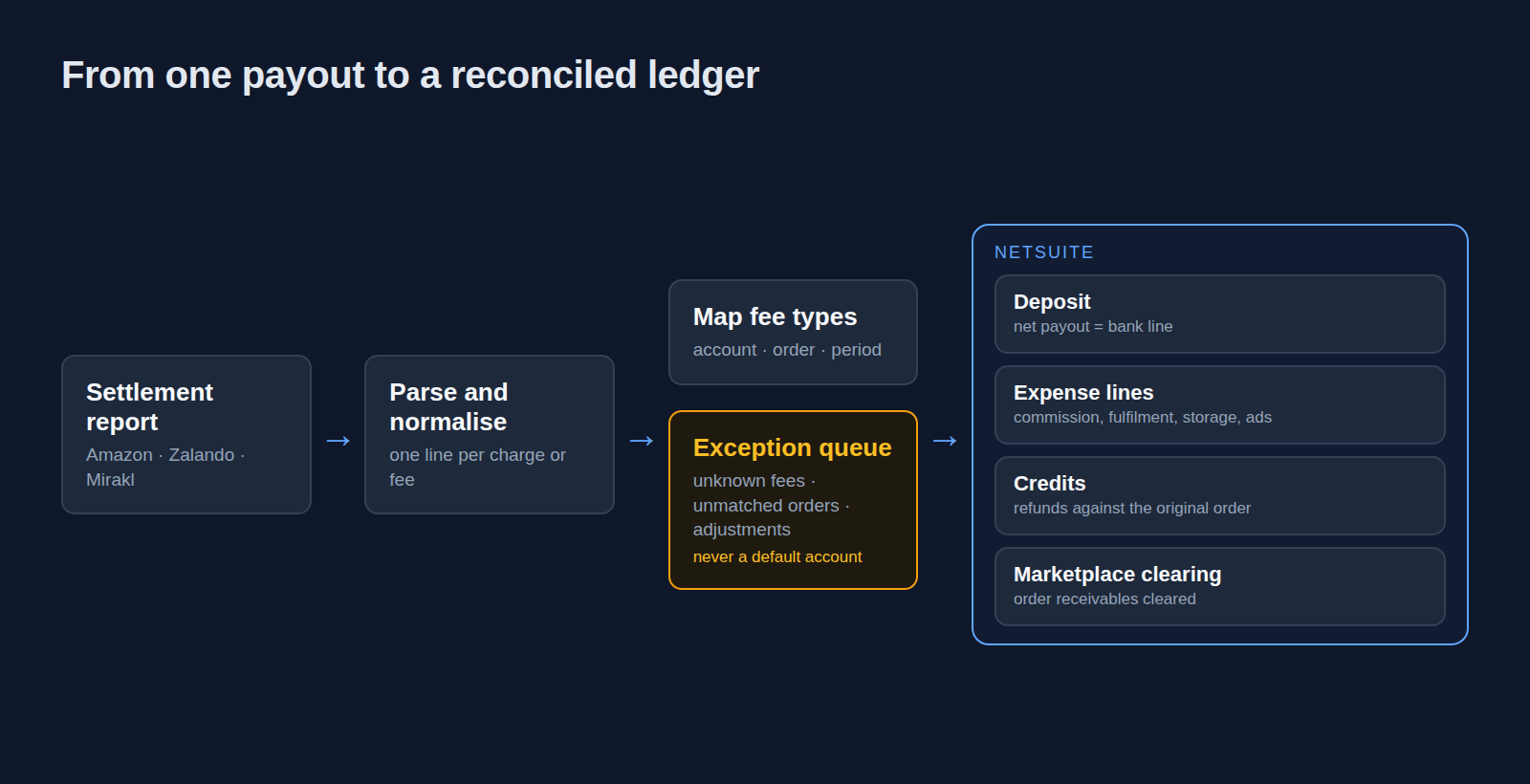
A settlement integration is complete when every line of every settlement has a home in NetSuite, or a named person looking at it. In practice that means:
- Ingestion of the settlement report, not only the bank line. The bank shows a net figure. The components exist only in the marketplace's report.
- A marketplace clearing account. Order-level receivables post to it, the settlement clears them, and whatever is left on it is your unexplained balance, visible instead of buried.
- A deposit for the net payout that matches the bank line exactly, so bank reconciliation becomes a formality rather than an investigation.
- Fee mapping. Every fee type is mapped to an account and, where it relates to an order, to that order. Commissions and fulfilment fees go to the order. Storage and advertising are period costs and post by period.
- Refunds and returns matched to the original order, whichever period they settle in. That is the difference between a credit note that makes sense and channel margin that is permanently wrong.
- Chargebacks and disputes in their own account with an owner, because they often arrive without a clean order reference.
- Reserves and holdbacks treated as a receivable, not a cost.
- Currency. The marketplace converts at a rate you did not choose. The difference belongs in FX, per settlement, across subsidiaries and currencies.
- An exception queue. Unknown fee types, unmatched orders and unexplained adjustments go to review, with the surrounding lines attached. They are never posted to a default account.
Amazon vs Zalando vs Mirakl
The three sources behave differently enough that each needs its own parser and mapping.
| Amazon | Zalando | Mirakl-based marketplaces | |
|---|---|---|---|
| What you get | A settlement report per settlement period | Settlement information in zDirect, the partner portal | Transaction lines and accounting documents through the seller API |
| Who sets the rules | Amazon | Zalando | Each marketplace operator |
| Watch out for | Report format changes | Sales dated by shipment, payouts dated by payment | A different fee set and billing cycle per operator |
Amazon. Settlement reports can't be requested or scheduled; Amazon generates them automatically. In the current flat-file format each charge or fee appears as a line with an amount type and description (Amazon SP-API, settlement reports, checked 29 September 2026). The older XML and flat-file settlement reports are being removed on 11 November 2026 in favour of the Flat File V2 report (Amazon SP-API changelog, checked 29 September 2026). An integration still reading the old formats has a deadline. This page covers only Amazon's settlements, not Seller Central or FBA operations.
Zalando. Partners get settlement information in zDirect. Zalando itself notes that its sales reports are based on the date each parcel shipped, while its DAC7 information is based on the date it paid the partner (Zalando Partner University, DAC7 FAQs, checked 29 September 2026). Those are two date bases for the same trade, and your ledger has to reconcile both.
Mirakl. Mirakl is the platform behind many retailers' marketplaces, not a single marketplace. Its seller API exposes transaction lines and accounting documents, and they can be filtered by billing cycle and by invoice or credit note number (Mirakl seller API, invoicing and accounting, checked 29 September 2026). Each operator configures its own fees and cycle, so two Mirakl marketplaces are two mappings.
How we build it
We choose the tooling per marketplace, not per project:
- Celigo, where a connector or flow already covers the source. We are an authorised Celigo partner and extend flows rather than rebuild them.
- Custom parsers, where the report format is unusual or changes often. These parsers fail loudly when a new fee type appears, instead of mapping it silently.
- NetSuite-side logic that writes deposits, journal lines, credits and clearing entries against the chart of accounts you already have.
- Agents for the residue. Decomposition and matching are high-volume, rule-bound work with a persistent ambiguous remainder. That is where an AI agent earns its place: it proposes the match, attaches the context and leaves the decision to someone in finance.
What changes at month-end
The goal is that month-end stops being spreadsheet archaeology. Settlements are reconciled as they arrive, not in a batch on day three of the close. The marketplace clearing account shows only what is genuinely open. The exception queue is short and has an owner. Channel margin by marketplace can be read from NetSuite instead of rebuilt in Excel.
A residue will remain, and it needs a policy: a materiality threshold, a write-off account and an approval rule. Anyone promising a zero residue hasn't seen enough settlement files.
Project shape
- Settlement review. Take recent settlement files from each marketplace and break them down by hand to find every fee type you can't currently explain. That list is the scope.
- Accounting decisions. Map each fee type to an account and a treatment, including reserves, chargebacks and a rule for unknown fees. Have your tax adviser confirm the VAT treatment of your specific flows.
- First marketplace. Build ingestion, mapping, the clearing account and the exception queue for the marketplace with the most volume, and run it in parallel with the current process.
- Further marketplaces. Add each one as its own mapping on the same design.
- Historical balance. Treat any existing suspense balance as a separate, time-boxed exercise with an agreed write-off, rather than a prerequisite.
If you also sell through your own store, the NetSuite–Shopify and NetSuite–WooCommerce integrations cover the order side. The settlement side stays the same for every marketplace.